
Choosing models
You can assign a different model to each surface. All of it is configured in one place — Settings → General → AI models — and getting it right is the difference between an answer that lands and one that arrives too late to use.
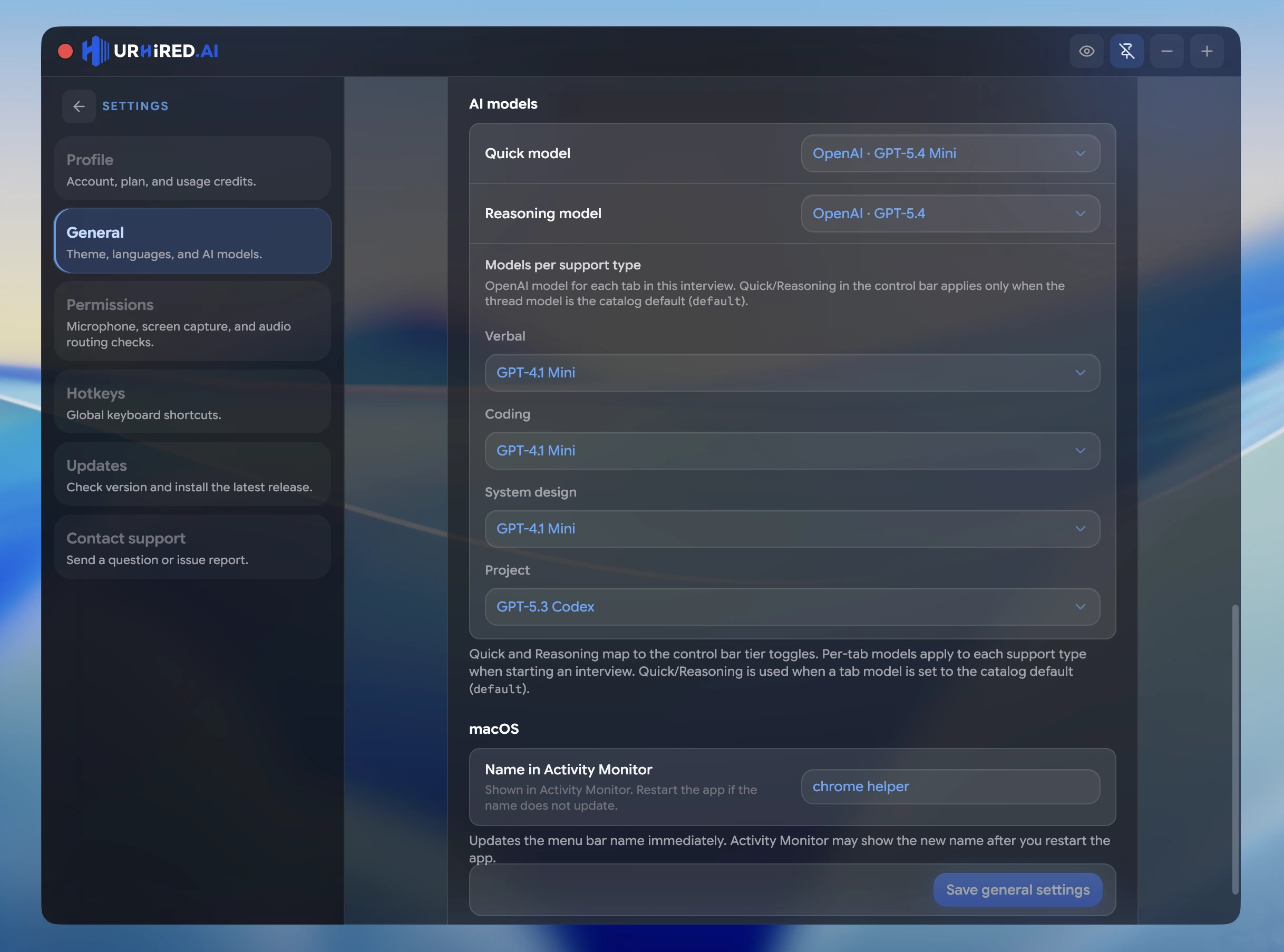
Where models are set
The AI models card in Settings → General assigns a model to each surface — Verbal, Coding, System design, and Project. Lists are curated per surface across OpenAI, Claude, and Grok. There is no model picker in the interview setup form.
Those choices are applied when an interview starts, and each surface keeps its model for the whole session. Claude and Grok appear in the lists for the tabs they fit.
Available models
| Model | Provider | Best for |
|---|---|---|
| GPT-6 Astra | OpenAI | Frontier reasoning for the hardest architecture rounds |
| GPT-6 Sol | OpenAI | Balanced coding and system design at the current flagship |
| GPT-6 Luna | OpenAI | High-volume speed at the lightest GPT-6 cost |
| GPT-5.6 Sol | OpenAI | Frontier-depth reasoning for the hardest rounds |
| GPT-5.6 Terra | OpenAI | Balanced depth and latency for everyday rounds |
| GPT-5.6 Luna | OpenAI | High-volume speed at the lightest 5.6 cost |
| GPT-5.5 | OpenAI | Deep reasoning across long sessions |
| GPT-5.4 | OpenAI | System design and complex technical reasoning |
| GPT-5.4 Mini | OpenAI | Fast behavioral answers where latency is visible |
| GPT-5.4 Nano | OpenAI | The fastest answers at the lightest cost |
| GPT-5.3 Codex | OpenAI | Live coding, algorithm problems, and project Q&A |
| GPT-5.2 | OpenAI | A balanced general-purpose option |
| GPT-5.1 | OpenAI | A stable older generation, still capable |
| GPT-4.1 Mini | OpenAI | Lowest latency and lightest credit cost |
| Claude Fable 5.1 | Anthropic | Long-horizon architecture and agentic reasoning |
| Claude Opus 5.5 | Anthropic | Deep architecture reasoning and nuanced tradeoffs |
| Claude Sonnet 5.5 | Anthropic | A strong all-rounder for coding and behavioral |
| Claude Haiku 4.5 | Anthropic | Fastest Claude for verbal rounds |
| Claude Opus 4.6 | Anthropic | Previous Opus generation, still strong on design |
| Claude Sonnet 4.6 | Anthropic | Previous Sonnet generation for live coding |
| Grok 4.7 | xAI | Fast coding rounds |
| Grok 4.6 | xAI | Coding rounds on the 4.6 generation |
| Grok 4.5 | xAI | Coding rounds on the 4.5 generation |
| Grok 4.3 | xAI | Fast verbal answers at a lower token cost |
| Grok Build 0.1 | xAI | Live coding rounds |
Per-surface lists are curated: verbal leans fast, coding leans Codex/Sonnet/Grok, system design leans Astra/Opus/Fable.
A pairing that works
| Surface | Model | Why |
|---|---|---|
| ⌘1 | GPT-6 Luna | In a behavioral round, a three-second pause reads as hesitation. Speed wins. |
| ⌘2 | GPT-5.3 Codex | Purpose-built for code; strongest on algorithm problems. |
| ⌘3 | GPT-6 Astra | Design rounds reward depth, and you have time to think anyway. |
| ⌘4 | GPT-6 Sol | Project Q&A is locating and explaining code, so a coding model stays. |
Prefer Claude for design rounds? Set the System design surface to Claude Opus 5.5.
The tradeoff to think about
Deeper models produce better answers and take longer to produce them. That cost is invisible in a system design round, where you are meant to be thinking, and very visible in a rapid behavioral exchange. Match the model to the pace of the round, not to a general idea of which is "best".